
About
Spectraloop is primarily a junk drawer of various audio files that I’ve made over the years, paired up with a browser-based loop slicer (desktop only for now). That, and some other miscellaneous projects.
All of the functions of the loop player, including transport controls, playback speed/pitch, playback location/slicing can all be controlled via pressing the associated keys on your keyboard! Just load up a loop, and use your computer’s keyboard to “chop” the file into sections. You can use the various controls to turn the original loop into something else entirely.
If you’d rather leave it up to chance, the player can load a random loop from the Spectraloop library or pull one in from the broader Freesound community!
Work in progress
Some of the longer loops take a while to load… If you don’t want to wait, just keep on clicking around until you find one that you like that loads faster :)
I’m still working out the kinks of the buffering system and should hopefully be able to improve the loading performance over time. This site mostly was a way for me to not feel so bad to have all of these loops sitting around in my library. They’re all free to download as well - use them however you’d like.
Inspiration
MLR
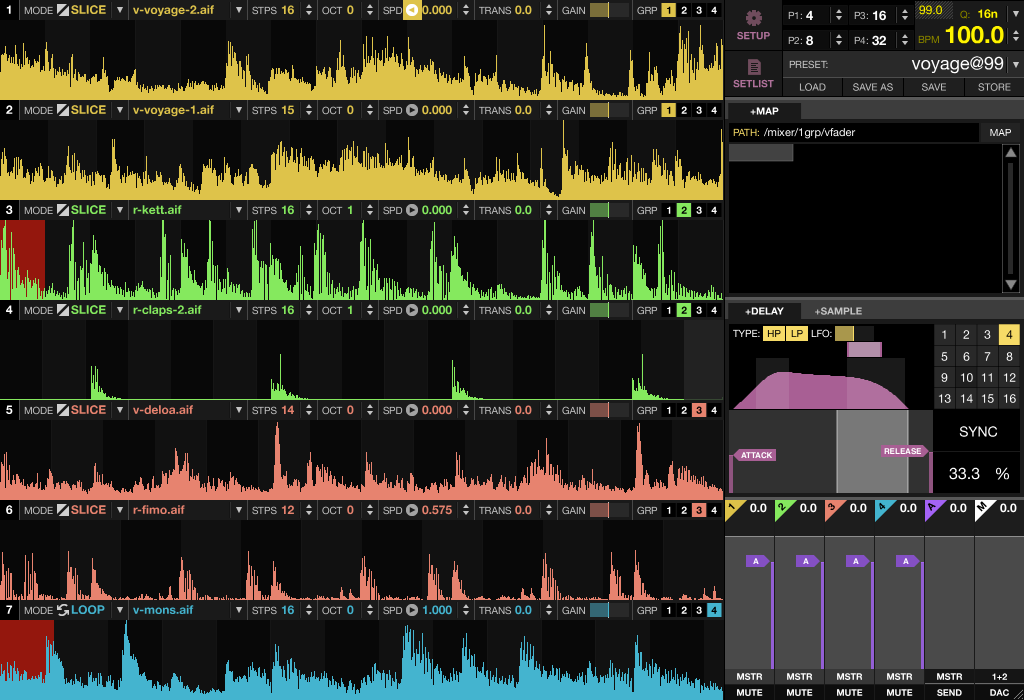
The 16-segment slicing functionality is almost completely inspired by the classic Monome grid apps MLR and MLRV, which were revolutionary apps in their time, and in many ways still are!
MPC
The chopping approach also owes a lot to the classic MPC workflow - loading a sample, slicing it across pads, and triggering pieces of it in real time. One of the most iconic iterations of that workflow is the use of choke groups: assign multiple pads to the same choke group and triggering one instantly silences the others, mimicking the physical behavior of an open hi-hat being choked by a closed one. That snappy, cut-off quality is a huge part of what gives MPC-style chopping its character, and has had a large influence on nearly every sampler-based workflow since, including Spectraloop.
Ableton Live
Parts of the project also take inspiration from similar workflows in Ableton Live, particularly Live’s Slice to Midi Track template functionality. If you’ve never played with Live’s Clip slicing features before, I highly recommend looking into it, there’s a ton of power hiding there! …Especially once you know how to set up your own custom slicing templates…
A similar effect can also be achieved in Live without any special templates: duplicate a clip several times on the same track, set each instance to start at a different position within the audio, and use Follow Actions to chain or jump between them. It’s a more hands-on approach but gives you a lot of creative flexibility, and is a great way to stumble into something unexpected.
YouTube
I just checked and this still works! Once a YouTube video has fully buffered in your browser, you can use your computer’s number keys to jump between various playback positions within the video. This neat trick was shared with me and passed amongst friends at parties and get-togethers, inspiring some great laughts & highly outrageous beats. If you never knew this was a thing, now you do!
Samplr
Last but not least, the phenomenal Samplr iPad app. I have yet to encounter a more intuitive way to interact with samples - it really is the best of the best!
Built with
Framework & Build
- Astro - static site framework, handles routing, content collections, and page rendering
- Vite - bundler (built into Astro)
Hosting & Deployment
- Cloudflare Pages - hosting and CDN, with the
@astrojs/cloudflareSSR adapter - GitHub - centralized source code versioning & integrated build deployment via Cloudflare
CMS
- Keystatic - git-based CMS for managing content (posts, loops, about, contact), backed by GitHub storage
Audio
- WaveSurfer.js - waveform rendering in the player
- Web Audio API - all the actual audio processing: playback, pitch/speed shifting, comb filter (verb/space/time), LP/HP filter tilt, buffer reversal
- ffmpeg (via
fluent-ffmpeg) - server-side script for generating waveform peak data
Storage
- Cloudflare R2 - serving audio files and misc media for the site
External Audio Sources
- Freesound - a collaborative database of Creative Commons licensed audio samples contributed by a generous community of sound designers, musicians, and field recordists from around the world. An invaluable resource for anyone working with sound.
UI
- React - pulled in as an Astro integration, primarily to support Keystatic’s admin UI
- Vanilla CSS with custom properties for theming. The logo was made in Adobe Illustrator.
Roadmap
It might be a minute before I can get around to many of these additional features, as this site is essentially just a rainy-day project for me in-between other life priorities. Rest assured though that one day that rainy day will come.
Still to do:
- Attack control to help minimize popping at the start of slices
- Control over filter’s resonance amount
- Sample upload capabilities & an input recording buffer
- Community voting system for ranking loops
Recently shipped:
Gate/momentary playback mode - hold a key to play a slice, release to stop with a short decay. Toggle with the Shift key(May 2026)Space and time randomizer - randomizes the space and time faders instantly (C key)(May 2026)Filter latch points - press M or ? to snap the filter to a low-pass or high-pass preset, press again to release(May 2026)Random file loader - load a random loop from the Spectraloop library or Freesound directly from the player(May 2026)
Thanks for taking the time to read this, and for visiting my site! Have fun!
↑ ↑ ↓ ↓ ← → ← → B A ↵ 😉